ARGON

High level views of ARGON

The home page gives a high-level architectural overview of ARGON, but here I'll give a few more detailed views of it as seen from various perspectives.

A user

You sit down at your desktop / open up your laptop / pull out your palmtop / sit down at a shared workstation in an office / computer lab / internet cafe, and in the case of a device that you personally own, are asked for your password; on other devices, you may be asked to enter a username or choose from a fixed list of users, or allowed an anonymous login.

Once logged in, you enter the browser. The exact details of the user interface are unspecified; I hope to have more than one interface, anyway. So I'll talk in general here. The browser is your window onto a world of entities; many of them are container entities that contain lists of other entities, providing the navigational structure. Everything is an entity; the things we'd think of as files and applications (although that particular distinction is avoided in ARGON in favour of a more object-oriented paradigm), as well as things like colours and concepts. Some entities are just static information you can view. Some you can edit. Some are interactive things like games or calculators or search engines. Some are interfaces to real-world objects like printers and cameras and nuclear reactors and computers (as in, the box on your desk: to turn it off, you find it in the browser and tell it to turn off).

The browser provides some kind of top-level menu of places to start browsing from: the resources of the computer your're sitting at (local removable drives, printers, etc); the resources of the local area network (shared printers, entities relating to the organisation that provides the network); resources autodiscovered locally (Bluetooth, Rendezvous, and so on); the global Internet directory; the local private directory of your employer; your private workspace (if you're not using it anonymously), etc.

You don't enter usernames and passwords into things, once logged in. You yourself are represented as an entity, and everything you do is identified as being done by that entity (unless you choose anonymity). Magic happens under the hood to tell entities what entity is trying to access their services, while preventing other entities from pretending to be you.

When you log out, then log back in again (even from another machine), your 'desktop' is exactly as you left it. And you never 'load', 'save' or 'close' things, it's all just entities that you interact with.

If you use an anonymous login, you can browse to find your own entity, then ask to assume its identity. If you enter your username and password correctly, then you're now logged in as yourself, with access to your private stuff and with other entities recognising your identity.

In some entities, you can create entities of your own. You can make entities within your user entity; that's your private area. And you may be able to create entities in shared or public areas. You do this by choosing a template entity, and choosing the entity within which you want to create your entity, and telling the browser to create. And hey presto, you get a new entity, with its access control set so that only you can access it, but that you get full control over it, until you specify otherwise.

A junior systems administrator

There's a bunch of servers, desktop machines, laptops, and embedded control computers, called a cluster. Your job is to sit at your nice ARGON workstation and pass the time until a little alert pops up that something's gone wrong, whereupon you switch to the cluster status display (a nice map of the network topology joining the systems of the cluster together) and see what's flashing red. You acknowledge the alert, then go and look at the node or network link that's in trouble, and repair or replace it. Sometimes one of the nodes is just plain broken, in which case you tell the cluster to forget about it since it's not coming back. Sometimes you get new nodes to add, in which case you have to ask your workstation to prepare an installation image on a USB key, and go and boot the new node from it. After answering a few questions about network setup (unless you're using DHCP), selecting the roles it will perform, and confirming that it's OK to reformat the entire disk, it sits there for a while talking to the other nodes to get up to date, then a new node appears on your cluster status display.

The other source of work is users. Sometimes, new users have to be created. You browse to the "Management Users" entity (or wherever) and choose "Create New" then select "User". Give them a name and a password, then head over to the access control database and assign them to some groups. And sometimes you delete users, too. Deleting the user's entity also deletes all their private entities within it.

A senior systems administrator

You have a nice cluster, with a few junior sysadmins to keep everything up and running. And you have users, who want to store lots of entities in your nice cluster.

Your job is to decide how to do it.

You create high-level administrative subdivisions called volumes within the cluster, by browsing to the cluster entity and telling it to do so. There's a "System Volume" already waiting for you when the system is installed, full of special system entities: namely, an entity for the cluster itself, an entity for each node, and an entity for the system volume itself. But you create volumes with names like "Management Users", "Shop Floor Users", "Customers", and the like. You grant permission to create entities in these volumes to your underlings. You tell the cluster entity what global resources you want available in the cluster, which become available as starting points to users browsing from machines in your cluster. You tell it which nodes are on the same LAN as each other, and then how those LANs are joined, so it can more efficiently route its group communications. You tell it which nodes are trusted with classified information, and which aren't. You monitor system load across the cluster, and alter the settings on volumes to trade off availability, performance, and resource utilisation, and order new nodes.

A programmer

You create and modify entities. In particular, you often create entities that contain useful machine-readable information, particularly source code.

To you, each entity is a bunch of data, represented as lists of logical statements: "This entity has the name 'Floor 7 Printer'". "This entity provides the 'Printer' interface, implemented by the code found in '/Ar/Fl/Hardware/Printer/Postscript'". "This entity is bound to the node '/MyCorp/BuildingA/Floor7/PrintServer'". "This entity's printer output stream is to the device '/MyCorp/BuildingA/Floor7/PrintServer/parallel0'".

Entities respond to requests that come from other entities. There's a communications interface called MERCURY that provides you with the API to send these requests to other entities, and you have to tell your entities how to handle requests with statements like "This entity provides the 'X' interface, implemented by the code found in 'Y'". Generally, 'Y' will be a 'template entity' containing code and static data pertaining to a class of entities, and as the user-visible layer, a template bundle record explaining how to make a new entity of that 'type', as a package of statements to start off the new entity with.

The statements in an entity can be grouped and structured, too. Internal metadata about the entity (such as where it code lives, what nodes it is bound to, and which physical interface the printer is attached to) can be grouped together and kept away from prying eyes other than your own and those of the system. Public metadata such as the title and what interfaces it provides can be put in another group and marked as public. Application state such as the print queue and be put in a third group and marked as readable by printer administrators only.

At the top level, your code is a bunch of event handlers; they get invoked, given details of the event from MERCURY, and given access to the entity's logical statement storage. You can query the entity's state, or issue new statements, delete old ones, or update old ones. Since lots of requests may be being handled at once by your entity, even on different nodes, you need to group your updates into transactions, and provide information about whether the transaction needs to become visible on all nodes before any other work can be done, or if the system can maximise throughput by rolling the change out across the cluster on a best-effort basis. Sometimes you need to be careful about clashes that can arise when the cluster is split in two (or more!) by a network failure, but you generally avoid that by planning your data model well in order to avoid having to write merging rules.

Since you've told your user entity that you're a programmer, your browser interface exposes the underlying workings of the system. You can view the public information any entity exposes in its raw form, as lists of statements, with the ones you are authorised to edit editable there and then. For entities you are responsible for, you can view and edit the private state, and issue requests in debugging mode and single-step through the request handler, watching the entity's state change as you go.

But perhaps most notable are the things you don't have to think about as a programmer. Things like "making my application scale", because the database layer and application layer you use scale it all for you. Things like deployment, since once your code is in the database, it's deployed. Things like servers.

Implementation roadmap

However, ARGON has been designed with sufficient modularity to allow it to be constructed incrementally - in stages. Here's an approximate road map to implementing a full ARGON system.

  1. HYDROGEN. An interpreted implementation in highly portable C, to ensure that it can run on any POSIX system. It should run on a UNIX system and provide all the basic threading, networking, and disk I/O interfaces. Code is provided in a sequence of text files that are run through the interpreter.
  2. IRON. In-memory representations of all the IRON types are needed on top of HYDROGEN, as well as code to read and write the binary serialisation format, and the textual notation for human interaction. All this can also be implemented in Java, C/C++, Perl, PHP, and Python, for non-ARGON clients. In order to support CHROME, it will need to provide linear typing and garbage collection.
  3. CHROME. The CHROME compiler uses the code generation interface of HYDROGEN to produce executable code. It's mainly used as a programming language handler for LITHIUM, at a higher level then this, but we implement it at this level because higher-level pieces of kernel code can then be written in CHROME, executed not in the restricted context entity handlers are run in, but with access to the full resources of the system by being able to embed arbitrary HYDROGEN code in the source.
  4. IRIDIUM. The basic protocol layer is required for both WOLFRAM and MERCURY. It needs to be implemented in terms of UDP (v4) first; other protocols can come later. Byte streams (UNIX domain sockets, pipes, serial cables, parallel cables, modems, ISDN, X.25 virtual circuits, and so on) are a logical next step, as is perhaps raw Ethernet - a full duplex loopbacked ethernet link between two machines can even provide real time bandwidth management.
  5. LITHIUM. It's actually a fairly simple bit of software at this stage; without clustering up, we just run the handler on the local node.
  6. MERCURY. The clustering stuff needs to be in there, but cryptography can be left for later. The implementation needs to be split into client libraries, ideally available in all the languages IRON and IRIDIUM are implemented in, and an implementation in HYDROGEN/CHROME that also includes the ability to run a server. The clustering can be used, but the copies of the entity running on each node need to handle their concurrency themselves (by keeping all persistent state in a shared SQL database, for example). And while the security code can be left out, the infrastructure for it (including appropriate fields in the wire protocol) need to be in place. At this point, we will have a basic application server supporting the lovely MERCURY programming model.
  7. CARBON. Now that MERCURY exists, CARBON can follow suit, and provide a naming/discovery system for the MERCURY client/server systems people can start to build, and storage for shared data resources.
  8. WOLFRAM. Here is the... 'fun' part. WOLFRAM is a load of code which will be hard to debug, since it needs to cater for all sorts of edge cases when packets are lost at awkward moments. But it will allow all those nodes that, until now, are manually configured into a cluster to start presenting a form of single-system image to entity developers. This implementation of WOLFRAM will have to make do without a properly replicated cluster entity; as such, it will need an externally-replicated cluster configuration file.
  9. TUNGSTEN.This will provide TUNGSTEN's distributed storage to the entity implementations, finally making it possible for them to do useful stuff without exploring beyond the boundaries of the virtual single-system image.
  10. WOLFRAM can now start storing its configuration information in an actual cluster entity and node entities in the distributed TUNGSTEN database. Now argond does not need any configuration files to bootstrap it beyond core stuff describing the available hardware that cannot be autodetected at startup, the source code of the system up to the level of TUNGSTEN, and where to find its volumes - all else it wants is stored inside the cluster entity, which is replicated to all nodes (although there ought to be an emergency repair option in TUNGSTEN to allow an up to date copy of the cluster entity to be manually loaded in, in case all the nodes in the cluster have changed their IP addresses while one is offline, making it unable to contact any of them to get the new list of IP addresses. The HYDROGEN kernel sources can now be stored in the cluster entity, LITHIUM can access entity handler metadata to decide which node to invoke handlers on, and the MERCURY handler configuration for each entity, along with CHROME source for the handlers, can be stored in the entity along with its data.
  11. The node entity can now be fleshed out properly to provide interfaces to modify the system sources and basic configuration information used to bootstrap TUNGSTEN.
  12. Then, finally, the other ARGON non-core modules can be focussed on. Many of them can have been being developed in parallel with the core development, certainly once CHROME is in place! Also, by now we really ought to have HYDROGEN implemented in platform-specific versions that compile to optimised machine code rather than byte code for the interpreter.

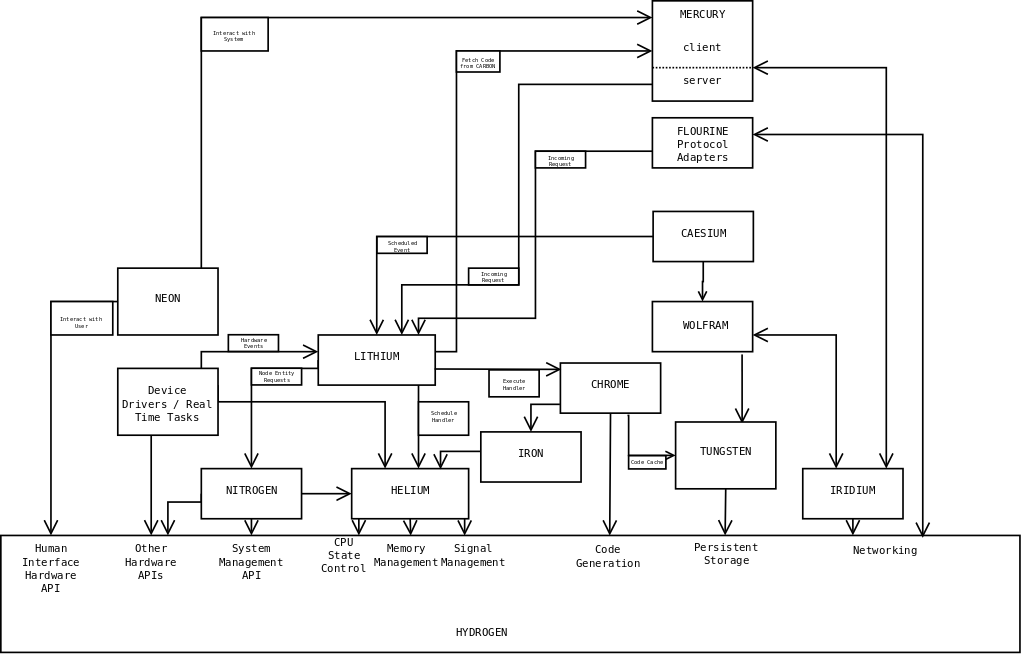
I've produced a shoddy diagram showing how the different components will fit together on a running ARGON node. I've shown everything running, although it will be possible to have nodes that run no user entity handlers and just (say) provide TUNGSTEN back-end services.

It's a big diagram - 1600 pixels across.